This article was prepared with AI assistance based on the Lumina Studio source code and workflow. If you find an error or have a clearer explanation, please comment on this page or propose an edit on GitHub.
Preset
Presets remember commonly used conversion settings so you can apply them to another image. Find Preset in Converter → Core Settings → Image Import and Basic Settings, between image import and the color source.
Save a preset
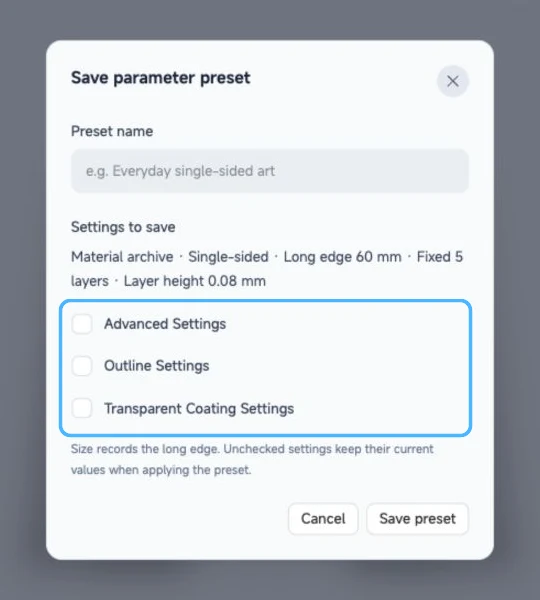
- Adjust the source, materials or LUTs, size, layer count, layer height and single- or double-sided settings.
- Choose Save as preset and enter a unique name of 1–40 characters.
- Review Settings to save. Advanced settings, outline and coating are optional and unchecked by default.
- Choose Save preset.
Size is saved as the image's long edge. For example, a 100 mm preset makes the long edge 100 mm for either a landscape or portrait image; the other dimension follows the image ratio. Saving a preset does not alter the original image.
Apply and manage presets
Choose a name from the Preset menu to apply it. Optional groups not included in that preset keep their current values. Check the materials, dimensions and other settings, then preview again. A previously downloaded 3MF is not updated.
If you change settings after selecting a preset, Modified appears. The saved preset is not overwritten automatically; choose Update preset to save the changes. You can also rename or delete the selected preset from the menu. Deleting it does not remove the settings currently in use.
Last used restores the saved previous conversion settings. When a project is imported, the menu also shows Current project settings.
Preset or project file?
A preset stores common parameters and references to the selected materials or LUTs, not the original image, preview or local color edits. On another device, check that the required material archives or LUTs are available. To save or share a specific artwork, also keep the source image and see Share Card and JSON.
Submit feedback
Your feedback is sent privately to the Wiki maintainers and is not displayed publicly on this page.